MineMoreBtc
Complete Guide
A web-based platform for streamlining Bitcoin mining operations — monitoring, provisioning, and full-site management from a single interface.
What is MMB?
MMB — short for MineMoreBtc — is an innovative web-based platform custom-designed to streamline mining operations monitoring and management, running on a secure Linux OS.
With its simple and user-friendly interface, comprehensive monitoring capabilities, and full miner management functionality, MMB serves as an indispensable asset for mining facilities. Hosted on a dedicated server within the mining site, MMB facilitates seamless control and oversight of all mining activities.
For small sites up to 10 MW, even a regular PC such as an Intel NUC with SSD storage works fine. For large sites, virtualisation and clustering/redundancy are also available. Our team can install MMB remotely, provide pre-built virtual machine files, or ship a preconfigured server directly to your location. All operational data stays on-premise — on your own hardware and network. Nothing is sent to external servers.
Beyond core monitoring functions, MMB offers a range of utilities to enhance operational efficiency: diagnosing issues, exporting data, implementing configuration solutions, and integrating with additional optional IT systems. In essence, MMB is a comprehensive mining management solution that empowers operators with the tools and insights needed to maximise output in a competitive landscape.
Feature Overview
Configuration Profile Assignment
Within MMB, users can create mining pool profiles and allocate them to specific locations (area or container) or individual miners. The platform boasts extensive compatibility with a variety of mining hardware:
Cooling support includes air-cooled, immersion, and direct chip hydro-cooled systems. With MMB's intuitive interface, operators can easily locate miners, rename them, modify pool assignments, and manage pool profiles — all while accessing essential performance data and error logs. Power-mode adjustment is available for Antminers, Whatsminers, Avalons, Auradine and Sealminer.
MMB supports both light and dark interface modes, including a dedicated dark mode for night-time eye protection.
Auto Provisioning
The auto provisioning feature — including pool profile assignment, account details, and worker names — operates seamlessly with proper IT network infrastructure. With this functionality enabled, there is no live miner in the network with wrong configuration.
This requires intelligent, manageable network switches that support: DHCP Relay, 802.1Q + 802.1p (QoS), SSH CLI, MSTP, LLDP, and SNMP. Without smart switches, auto provisioning is still possible — miner naming would simply be done manually.
Integration is undertaken with DHCP servers, LibreNMS (IT infrastructure monitoring), and MMB using customised modules designed specifically for auto provisioning. This streamlines deployment and facilitates rapid server configuration changes while bolstering security — miner configuration is verified on every reboot or DHCP IP request. Configuration tasks are executed without reliance on local technical support personnel.
Supported Models
MMB provides full management — pool, power mode and reboot control — for Antminers (including LuxOS and Hiveon firmware), Whatsminers, Avalons (air, immersion and hydro), Auradine (TeraFlux) and Sealminer. LuxOS adds sleep/active mode and firmware-update triggers. Any other ASIC can be brought in through the generic driver for monitoring, enabled per site.
Need compatibility with newer firmware or unsupported hardware? The MMB support team can accommodate such requests with flexible integration updates on demand.
Dashboard
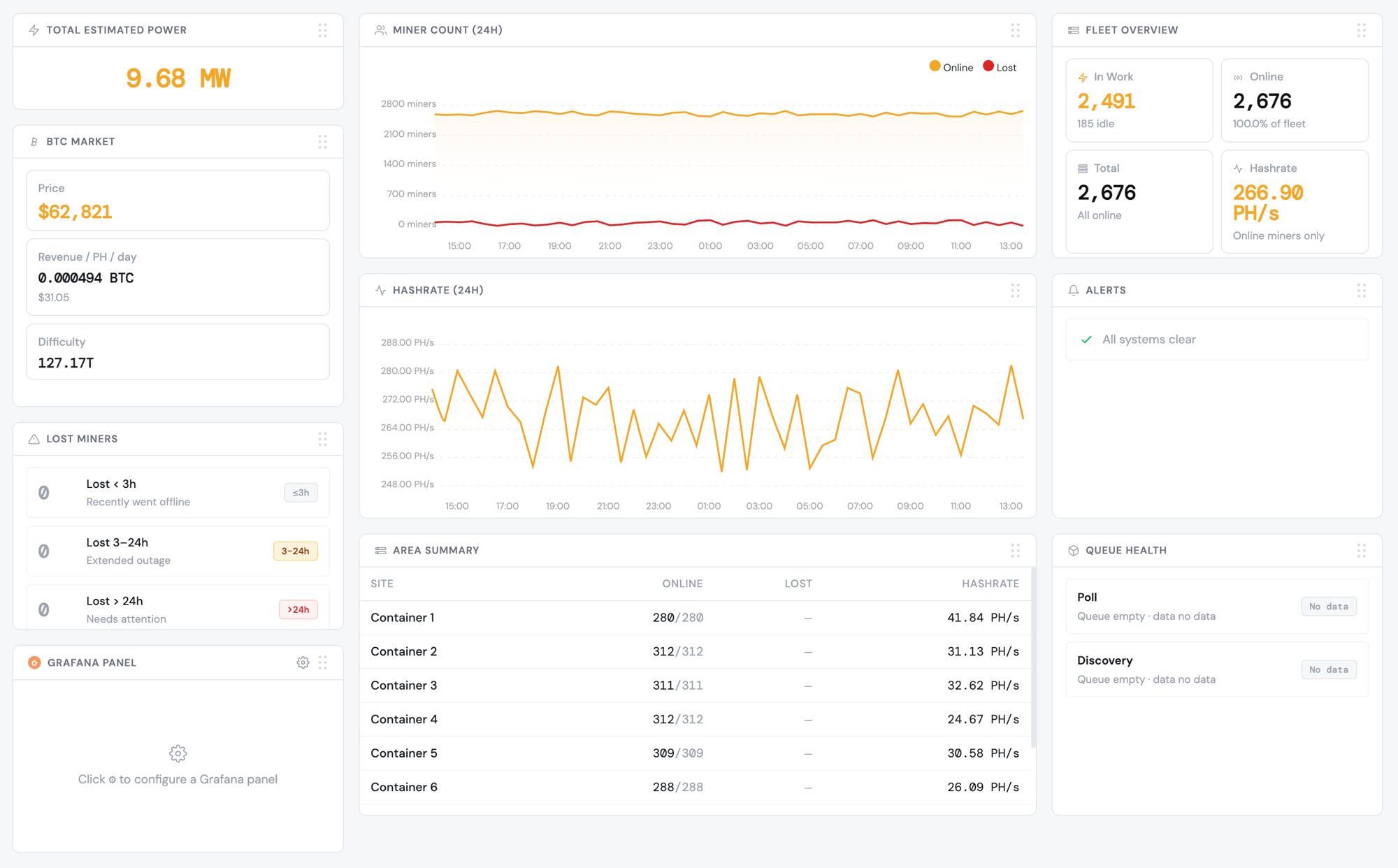
The dashboard furnishes vital insights regarding the site's comprehensive performance. It displays a complete list of all configured areas and containers, along with miner quantities and primary parameters (IP, name, model, temperature, hashrate, etc.).
Dashboard Widgets
The dashboard includes a rich set of configurable widgets providing real-time and historical data:
- BTC price, block reward, mining block fees, network hashrate, difficulty, and estimated daily reward per 1 PH
- Hashrate and miner count graphs (historical trend)
- Area live info — location, HR, in-work miners, live miners, lost count, temperatures, estimated kW
- Area/location miner pool usernames and power mode by location (sleep / low / normal / high / custom)
- Lost miners over 3h, 24h, and all-time periods
- Server model by location, lost hashboards (HB), and fan error count tables
- Server models and firmware versions across all monitored sites
- Pool servers in use; also pool API integration to pull data directly from pool servers
Custom widgets can be created upon request.
All / Live / Lost Miners
The Live Miners view presents a tabular display of all currently active miners. The All Miners and Lost Miners views follow the same layout with automatic filters applied.
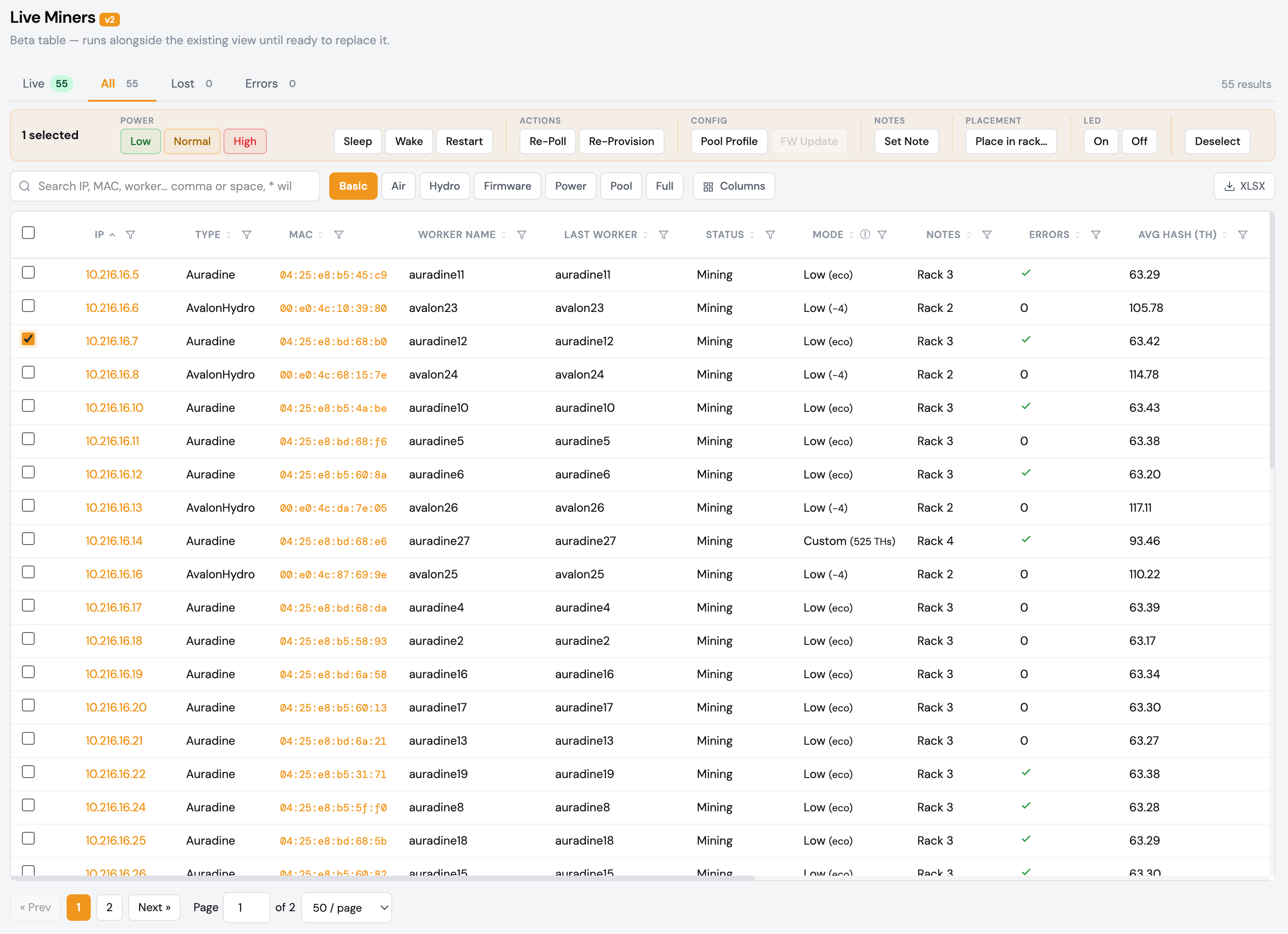
Users can customise their view by showing or hiding columns, sorting, and applying filters — including wildcard "*" support. Various batch operations are available from buttons at the top: profile provisioning, restarting, and firmware update triggers (LuxOS). Data can also be exported to Excel for further analysis. For advanced users, a custom query builder is available at the bottom of the page.
Individual Miner View
Clicking a miner's MAC address opens a comprehensive overview of all available data and history logs for that specific unit. An interactive poll feature retrieves real-time statistics directly from the miner instantly. At the bottom of the page, users can review the history of executed configuration batches. Clicking the miner's IP address opens the miner's own web interface in a new browser tab.
Error Miners
Displays a list of live miners that have active errors, with a description of each issue and a remediation recommendation shown in the right column of the table. This allows operators to quickly triage and action hardware or configuration problems across the site.
Rack Maps
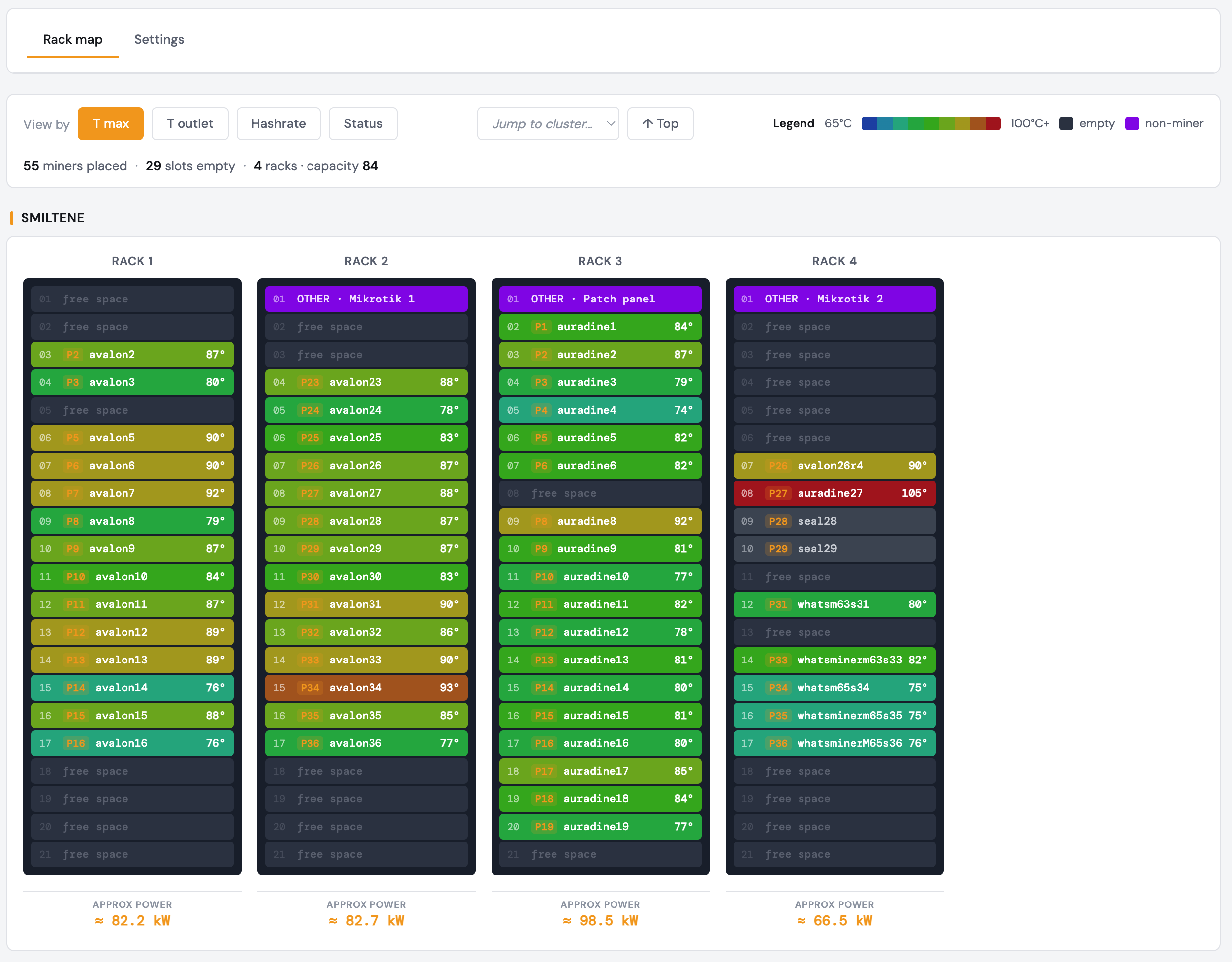
Displays graphical representations illustrating miner performance within racks, shelves and area locations — showing hashrate and temperature (chip or outlet) per physical slot as a spatial heat-map. Rack layout logic is configurable via the Network page, and miners auto-place onto the correct slot from switch-port topology (see Auto Provisioning). Manual rack and miner placement is also supported.
System Health
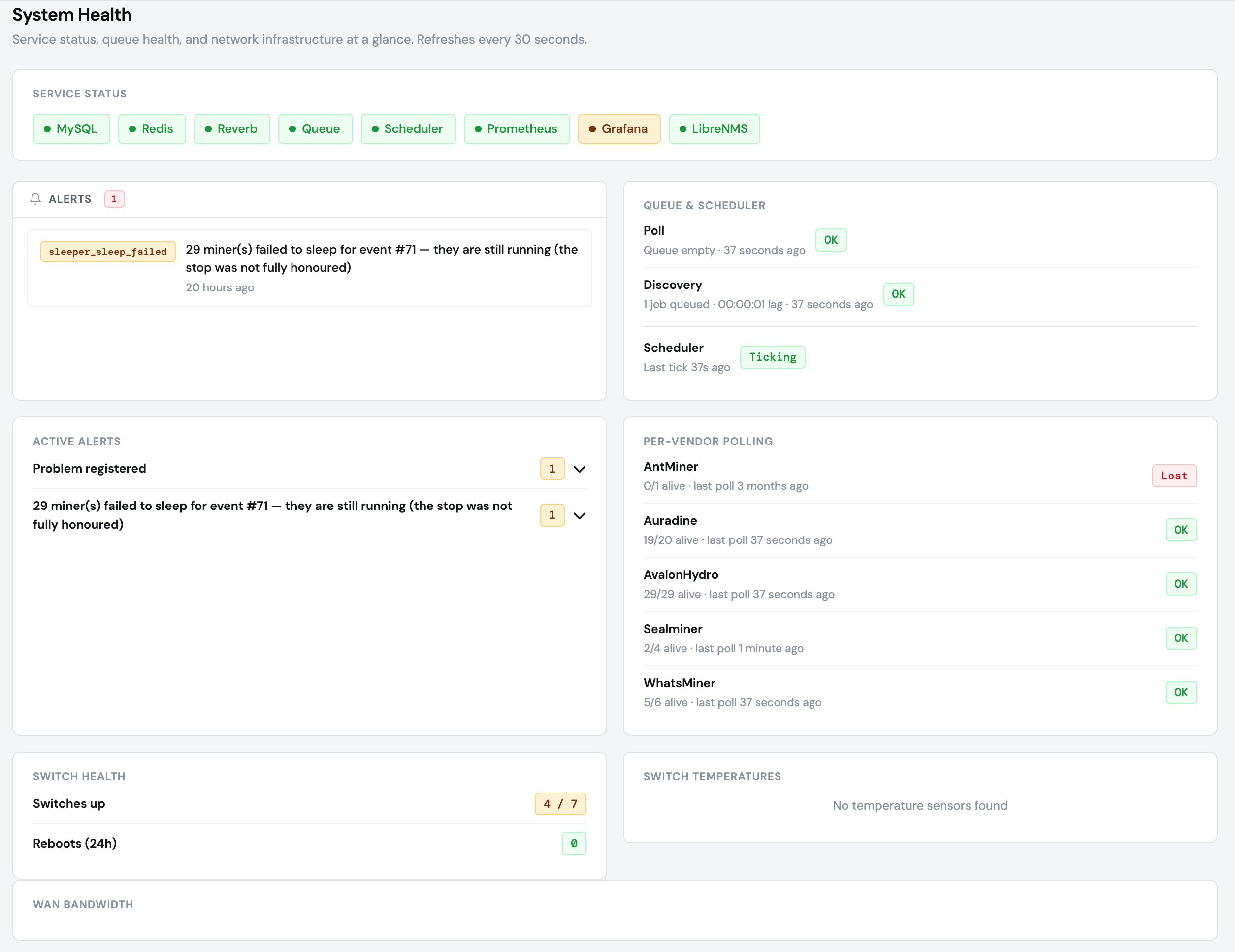
System Health is the single page that tells you whether the whole platform — not just the miners — is behaving. It surfaces a live grid of active alerts across three areas: fleet (mass-offline events, overheating, low coolant), placement & automation (rack slot collisions, stranded placements, reconcile safety-stops), and infrastructure (LibreNMS / proxy / metrics connection down, duplicate switch names, unmatched mappings, queue-health lag). Power and price alerts from the scheduler — a stale Nord Pool feed, or a failed wake/sleep ramp — land here too.
Network and IT infrastructure is monitored through the open-source LibreNMS system — servers, switches, SFP modules, routers, firewalls and ISP link utilisation — and switch temperatures and per-vendor polling health roll up alongside the miners. Optional Telegram push notifies your on-call team; the in-app alerts widget and this page are the primary surface.
CCTV
MMB streams live CCTV directly in the browser for cameras installed on-site. Any ONVIF/RTSP camera or NVR is supported — Hikvision, Dahua and others — via automatic ONVIF discovery and a built-in go2rtc gateway that plays the streams in-browser. This puts your whole site — miners, infrastructure and video — behind one login.
Power Schedule & Curtailment
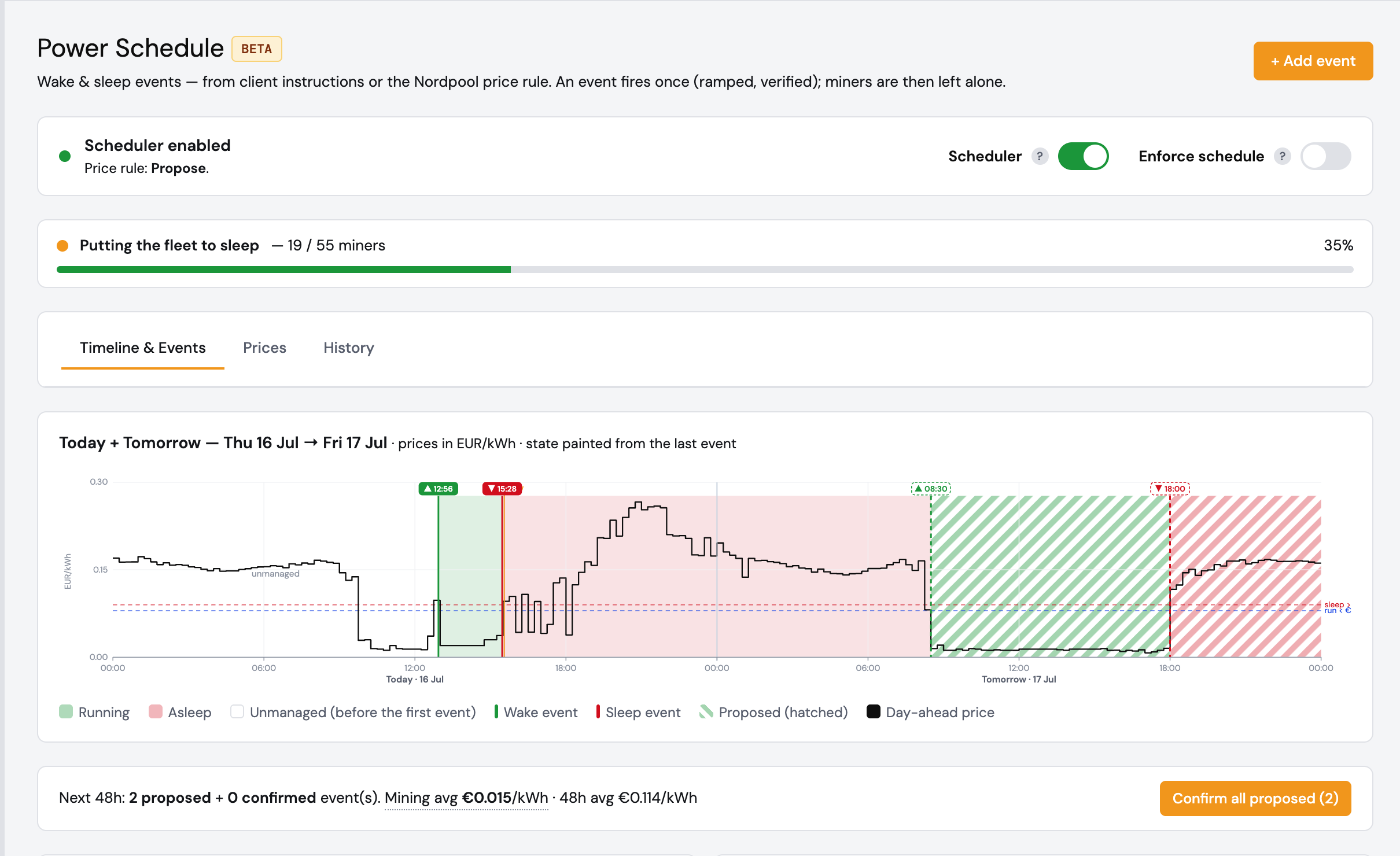
MMB can automatically curtail or sleep the fleet when electricity is expensive and wake it when prices fall. It reads day-ahead electricity prices (Nord Pool, with an Elering fallback) and, against a schedule or price rule, ramps groups of miners down and back up — issuing verified vendor power-mode commands, not just cutting pool access. A safety gate never sleeps a miner it can't reliably wake again, and every ramp is recorded as a tracked batch with live progress and its own alerts (stale price feed, failed wake/sleep) on System Health. Site power is measured over Modbus, so curtailment can target a real kW ceiling.
Clusters
Clusters group miners by physical container or logical unit so that naming, pool profiles and power policy can be applied and reconciled per cluster rather than one miner at a time. An automation (reconcile) engine continuously keeps each miner's worker name aligned to its rack position; pool reconciliation is available and enabled per cluster. Bulk actions — rename-all, apply-pool — run as rolling, tracked operations.
Tools
Batch Status
Shows the complete history and current status of all executed configuration batches, including who or what initiated each one — an operator, or an automated program such as the Power Scheduler. Power Schedule ramps run as tracked batches with live progress. Data can be exported to Excel files.
Deleted Miners
Displays a list of previously deleted miners. If a miner comes back online, a new record is automatically created in the MMB database.
Miner Debug
Select a miner type, enter its IP address, and pull live diagnostic data directly from the miner for troubleshooting — all available stats are shown in real time.
Miner Logs
Shows the action log for all completed operations against computing servers, including: Restart, Power Mode change (manual or by the Power Scheduler), Pool change, Miner Provisioning events, Worker Name change, and Firmware Update triggers (Antminer / Auradine / LuxOS).
Proxy Management
Integration with HAProxy — a free, fast, and reliable reverse-proxy offering high availability, load balancing, and proxying for TCP and HTTP-based applications. No stratum or hashrate is touched.
Operators can view all proxy ports created, disable any pool profile (easily move miners between pool records), or disable primary/backup internet links (e.g. main fibre optics and backup 4/5G). Separate records per miner model let you cut a whole group off from the pool instantly, without touching individual miners. (For true low-power sleep that also saves electricity, use the Power Schedule, which issues verified vendor power commands with a "never sleep what we can't wake" safety gate.) Frontend (pool connections) and Backend (miner connections) counts are visible at a glance. Proxy servers can be single-instance or clustered, on hardware or virtualisation platforms.
Isolation & Mitigation
The proxy acts as an intermediary, isolating internal miners from the public internet and filtering malicious traffic before it reaches your infrastructure.
IP Obfuscation
Mining server IP addresses are not exposed to the public internet, reducing the risk of targeted attacks on your infrastructure.
Filtering & Inspection
The proxy filters malicious connections and known bad actors, and inspects traffic for unusual patterns that may indicate an attack vector.
Distribution & Resilience
Distributes incoming mining traffic across multiple servers, preventing bottlenecks and increasing resilience against hardware failures.
Authentication & Authorisation
Ensures only authorised miners connect to pool resources. Prevents misconfigured miners from sending hashes to wrong/old pools (where the client pays power with zero revenue).
Logging & Alerts
All connections are logged, creating a comprehensive audit trail. Continuous traffic monitoring enables real-time detection and response to security threats.
Protocol Management
Restricts traffic to only the required protocols for Bitcoin mining, reducing the overall attack surface of the infrastructure.
Caching & Compression
Proxies can cache frequent requests to reduce latency and compress traffic to improve bandwidth efficiency across the site.
System Settings
A single admin page for tuning platform behaviour: hashrate and temperature thresholds (used for alert colouring and the rack-map gradients), dashboard display options, auto-provisioning master switches and naming conventions, vendor API credentials, Telegram alert routing, and default rack-map dimensions. Every individual setting is documented in the in-app operator manual.
Power Efficiency
Input miner efficiency (in W/THs, e.g. 23) for each miner model and power mode observed in the network. This data is used to estimate area power load shown in the main Dashboard. Also record self-consumption data per location (lights, switches, etc.) in the Network page.
Run a test for each miner model in all used power modes to measure real efficiency, then input the actual values. For exact, measured power, MMB reads site meters over Modbus (e.g. Schneider PM5300 / PowerTag); this measured power also drives the automated Power Schedule.
Pools
Create profiles for configuring multiple pool servers, which can subsequently be allocated to areas/containers, clusters or individual miners. When the re-provision button is pressed, if a miner has an individually assigned pool profile it overrides the area default.
Network
Use the Network page (formerly Location Management) to define your site's logical structure — locations, subnets and rack layout. Network discovery scopes (formerly a separate Ping Discovery page) are configured here too. Key fields:
- Location Name — displayed in the dashboard as a location/area label (e.g. "C1" or "Area1"). Create as many areas as your site requires.
- IP Subnet — the IP address subnet assigned to this area (e.g. "192.168.1.0/24"). /25 and /23 subnets are also supported.
- Watts on self-consumption — watts used by the area's own infrastructure (switches, lights, etc.), added to the estimated area power use in the dashboard.
- Pool Profile — the default profile pushed to miners in this area during manual provisioning.
- Rack overrides — custom JSON code for racks with non-standard dimensions. Example:
{"1": {"rows":6,"columns":4}}makes rack 1 have 6 shelves and 4 server spots per shelf.
All fields can be edited by clicking on them, or deleted with the bin icon. Set a location's auto-provisioning flag to "1" to disable it for that specific area.
Network Discovery
Configured within the Network page. Add a discovery scope by entering a Location Name, IP Range Start, and IP Range End (e.g. 192.168.1.1 to 192.168.1.254). The range can be a full subnet or a limited range of addresses to scan.
Location data is updated on each device poll. If no miners are found in a location, it is not shown in the MMB Dashboard. A batch job is dispatched every 5 minutes, followed by a background polling process. It is recommended to use a separate isolated VLAN per server area for security and performance.
Miner Discovery
Once MMB is up and running and ping discovery settings are entered, the platform will begin polling data from miners into the MMB database within approximately 5–10 minutes and start displaying miner data on the dashboard.
Auto Provisioning
The auto-provisioning process is controlled by two flags:
Global Enable Flag
A master switch in System Settings that enables or disables auto-provisioning across the entire MMB instance.
Location-level Flag
A per-location flag in Admin → Network that can disable auto-provisioning for specific areas while leaving it active elsewhere.
Profile Assignment Logic
Each location can have a default attached pool profile. A miner-specific profile overrides the location default. When provisioning is triggered, the pool setting is configured using the "last known good worker name" for that miner.
DHCP Relay Auto-naming
When auto provisioning is triggered, the worker name is calculated from DHCP Relay inputs (which switch port the miner came from) based on a preconfigured naming logic matrix. Note: if auto provision is active, it will overwrite any manually assigned miner name on the next trigger event.
Other Integrations & Infrastructure
A comprehensive computing site is recommended to include the following components, all leveraging open-source, Linux-based solutions for robust and flexible infrastructure monitoring:
Network Segmentation
VLANs for computing servers per location, management network, CCTV, WiFi, and more. Redundant clustered firewalls, VPN gateways, and routing gateways.
Environment Sensors
Integration with temperature sensors, smart PDUs, intelligent power breakers, and Aranet sensors (SAF Tehnika) on sub-GHz frequencies for rapid, wireless deployment.
Power Monitoring
Integration with ABB, Schneider Electric, and other industrial power infrastructure devices. Redundant DHCP and proxy servers for high availability.
Alerts & Observability
Live in-app alerts dashboard and System Health page, with optional Telegram push for on-call. A full observability stack ships alongside: Prometheus metrics, Grafana dashboards (embedded per-miner), Loki log search, and Laravel Reverb for real-time updates.
Interconnections between network devices are recommended via fibre optic cables for reliability and electromagnetic immunity. Power reliability is maintained through UPS with redundant ATS configurations, integrated with diesel generators for continuous operation.
Pool API integration enables automatic data recording into Google Sheets or other systems. VPN access (secure remote access to the MMB site management system) can be provided to clients.
MMB is available as a licensed software product (with updates included) on a pay-per-miner per-month basis, or as part of a comprehensive 24×7 manned remote monitoring service package. This package includes full IT infrastructure management and cybersecurity support for seamless, uninterrupted computing site operations. Pricing depends on site size.